
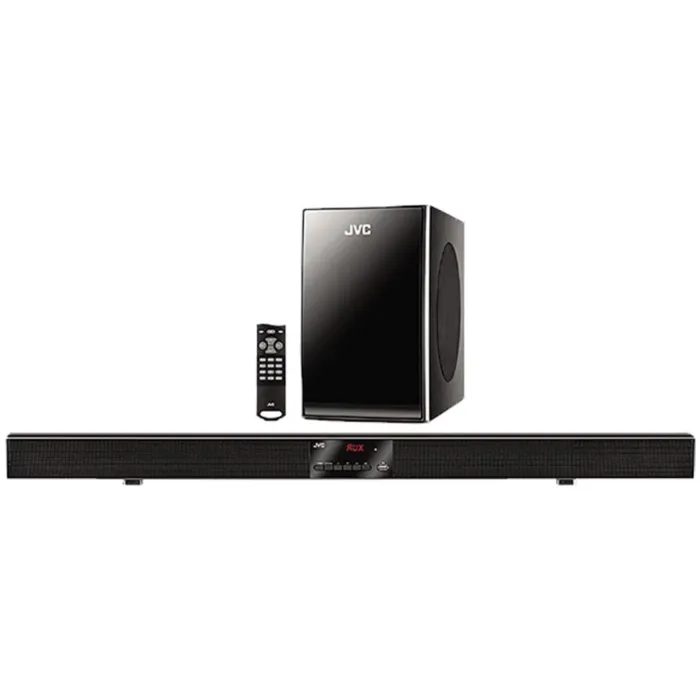
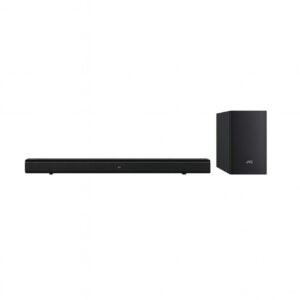
JVC 2.1 Channel Bluetooth Soundbar with Subwoofer (TH-BY370)
Original price was: R1 499.00.R1 399.00Current price is: R1 399.00.
The JVC 2.1 soundbar (TH-BY370) upgrades your TV sound with a soundbar and separate subwoofer for clearer dialogue and deeper bass. Connect through HDMI ARC or optical, stream over Bluetooth, play from USB or tune in to FM radio.
- 2.1 channel soundbar with separate subwoofer
- HDMI ARC and optical inputs for your TV
- Bluetooth wireless music streaming
- USB playback, AUX input and FM radio
- Remote control included
5 in stock (can be backordered)
The JVC 2.1 soundbar (model TH-BY370) is a complete TV sound upgrade in one box: a slim soundbar for clear dialogue and a separate subwoofer for deep bass. It connects to your TV through HDMI ARC or optical, streams music over Bluetooth, and adds USB playback and FM radio, so it covers movies, sport, music and gaming from one system.
Why Choose A Soundbar With Subwoofer?
Today’s slim TVs have very little room for speakers, so bass is weak and dialogue can get lost under music and effects. A soundbar with subwoofer fixes both problems. The soundbar handles voices and detail, while the subwoofer takes care of the low frequencies that give explosions, stadium crowds and music their weight.
The JVC 2.1 soundbar splits the work this way, so you get clearer speech without turning the volume right up, and bass you can actually feel during action films and big sporting moments.
Connect To Your TV With HDMI ARC Or Optical
HDMI ARC is the simplest way to connect a soundbar to a modern TV. One HDMI cable carries the sound from your TV to the JVC 2.1 soundbar, and on most TVs you can control the soundbar’s volume with your TV remote. No extra remotes needed for everyday viewing.
If your TV doesn’t have HDMI ARC, use the optical input instead, which gives you a clean digital connection. An AUX input is also there for older TVs and other audio devices.
Deep Bass From The Separate Subwoofer
The subwoofer is what sets a 2.1 system apart from a basic soundbar. It adds the low-end punch that small TV speakers and single soundbars can’t produce, giving movies, gaming and music a fuller, more cinematic sound. Place it on the floor beside your TV unit or in a corner to get the most from the bass.
Bluetooth Music Streaming
The JVC 2.1 soundbar doubles as a home music system. Pair your smartphone, tablet or laptop over Bluetooth and stream playlists, podcasts and online radio wirelessly. With the subwoofer adding bass, music sounds far fuller than through your TV or a small portable speaker.
USB Playback And FM Radio
Plug in a USB flash drive to play your own music files directly, without using your phone. The built-in FM radio lets you tune in to your favourite local stations for news, sport commentary and music, with no app or internet connection needed. It’s handy during load shedding if your TV setup is on an inverter.
All The Connections You Need
- HDMI ARC: one-cable connection to your TV, with TV remote volume control on most TVs.
- Optical: digital audio for TVs without HDMI ARC.
- AUX in: connect older TVs and audio devices.
- Bluetooth: stream from your phone, tablet or laptop.
- USB: play music from a flash drive.
- FM radio: listen to local radio stations.
Remote Control Included
The included remote lets you adjust the volume, switch between inputs and control playback from your seat. If you connect through HDMI ARC, you can also use your TV remote for volume on most TVs.
Where The JVC TH-BY370 Works Best
- Main lounge: fuller sound for movies, series and sport.
- Family room or games room: deeper bass for consoles and action games.
- Entertainment area: Bluetooth music for get-togethers.
- Bedroom with a large TV: clearer dialogue at lower volumes.
Pairs Well With A New TV
Even good TVs have limited built-in speakers. If you’re buying a new 50 to 75-inch TV, adding the JVC 2.1 soundbar gives you sound that matches the bigger picture, at a fraction of the cost of a full home theatre system.
JVC TH-BY370 Specifications
| Brand | JVC |
| Model | TH-BY370 |
| Type | 2.1 channel soundbar with subwoofer |
| Power | 1000W PMPO |
| Subwoofer | Separate subwoofer ([confirm wired or wireless]) |
| TV Connections | HDMI ARC, optical, AUX in |
| Wireless | Bluetooth |
| Media Playback | USB |
| Radio | FM |
| Remote Control | Yes |
| Boxed Dimensions | 98 x 42 x 21 cm |
| Gross Weight | 6.4 kg |
| Colour | [confirm] |
| Warranty | 1-year JVC warranty |
What’s In The Box
- 1 x JVC TH-BY370 soundbar
- 1 x Subwoofer
- 1 x Remote control
- 1 x User manual and warranty booklet
Frequently Asked Questions
How do I connect the JVC 2.1 soundbar to my TV?
Use an HDMI cable from your TV’s HDMI ARC port to the soundbar’s HDMI ARC input. If your TV doesn’t have HDMI ARC, use an optical cable or the AUX input instead.
Can I control the soundbar with my TV remote?
On most TVs, yes, when you connect through HDMI ARC. A separate remote is also included.
What does 2.1 channel mean?
The “2” is the left and right speakers in the soundbar, and the “.1” is the separate subwoofer for bass. It gives fuller sound than a 2.0 soundbar without a subwoofer.
Can I play music from my phone?
Yes. Pair your phone over Bluetooth and stream music wirelessly.
Does the JVC TH-BY370 have a radio?
Yes. It has a built-in FM radio.
Where should I place the subwoofer?
On the floor near your TV unit works well. Placing it near a wall or corner usually gives stronger bass.
Why Buy From Interiorhood
Interiorhood is an authorised reseller of JVC and other leading appliance and electronics brands, so you get genuine stock. Order the JVC 2.1 soundbar online, with delivery across South Africa in 5–14 working days. Pay in full by card, or spread the cost with PayJustNow or Payflex. If it isn’t right, you have 7 days to return it.
Need something smaller and portable? See the JVC TH-N324B Bluetooth Soundbar, browse our smart TVs at Interiorhood, or read about how HDMI ARC works.
| Weight | 6.4 kg |
|---|---|
| Dimensions | 21 × 98 × 42 cm |
Be the first to review “JVC 2.1 Channel Bluetooth Soundbar with Subwoofer (TH-BY370)”
Related products
Black Friday Deals
Midea 8kg Front Loader Washing Machine – Titanium (MF110W80-T)
Black Friday Deals
Midea 11kg Top Loader Washing Machine – Titanium (MA200W110-T)
Black Friday Deals
Black Friday Deals
Black Friday Deals
Black Friday Deals
 Kitchen
 Dining
 Living Room
 Bedroom
 Electronics & Appliances
Reviews
There are no reviews yet.